The problem with email today
Email remains the backbone of business communication. Contracts, strategy discussions, client data, financial information, intellectual property, and day-to-day operational details all flow through it.
The risk is no longer just interception in transit. The bigger problem is what happens after the message arrives.
Most email providers can read the content of your messages. They store the plaintext (or hold the keys that unlock it). That content is routinely scanned, indexed, analysed, and in many cases used to train models, improve services, or create commercial value. Even when a provider claims not to “sell” your data, the data itself often becomes part of the product.
AI has turned a long-standing weakness into something far more serious. Large language models are trained on vast amounts of text. Email is one of the richest sources of real business language, decisions, relationships, and proprietary knowledge. What used to be occasional scanning for spam or features has become systematic extraction of organisational knowledge. Confidential information that once stayed inside a company can now be absorbed into systems that competitors, investors, or other parties may later benefit from.
In short: almost every major service provider that businesses rely on also acts as a data broker in practice. They collect, process, and monetise information in ways that serve their own interests. Email has become one of the primary channels through which that happens.
What traditional email security actually protects
Most people believe their email is “encrypted.” In the common case, that means TLS.
TLS protects the connection between your device and the mail server (and between mail servers). It stops casual eavesdropping on the network. Once the message reaches the provider’s servers, however, it is typically decrypted and stored so the provider can deliver it, index it, run features, and serve it back to you.
TLS answers the question: Can someone watching the network read this message while it is moving? It does not answer: Can the mail provider itself read this message?
The answer to the second question, for ordinary email, is usually yes.
What Client-Side Encryption (CSE) is
Client-Side Encryption means the message is encrypted on the sender’s device before it is sent to any server. The mail server only ever receives ciphertext. Decryption happens only on the recipient’s device.
In a properly designed CSE system:
- The content is encrypted locally.
- The encryption keys are controlled by the users (or by a key service the organisation controls).
- The mail provider never receives the keys that can unlock the content.
- Even if the provider is compelled to hand over data, what they can produce is unreadable ciphertext.
This is fundamentally different from both ordinary email and from “encryption at rest” that the provider itself manages.
How CSE differs from normal email and from TLS
| Aspect | Normal Email | TLS-protected Email | Client-Side Encryption (CSE) |
|---|---|---|---|
| Encryption location | None (or provider) | In transit only | On the user’s device |
| Who can read the content | Provider + recipient | Provider + recipient | Only the intended recipients |
| Provider holds usable keys | Yes | Yes | No |
| Protects against network sniffing | No | Yes | Yes |
| Protects against provider access | No | No | Yes |
| Protects against AI training on content | No | No | Yes (provider cannot see plaintext) |
TLS is necessary. It is not sufficient if the goal is to keep the content confidential from the service provider itself.
Why only the end users can read the emails
In a CSE model the cryptographic keys that unlock a message never leave the control of the authorised parties. The mail server stores and forwards encrypted data. It has no technical ability to turn that data back into readable text.
This is not a policy promise. It is an architectural property: without the keys, the ciphertext is useless. Because the keys are managed outside the mail provider (through a Key Access Control List Service — see below), the provider is simply not in the position to decrypt.
How CSE works technically and the role of the KACLS
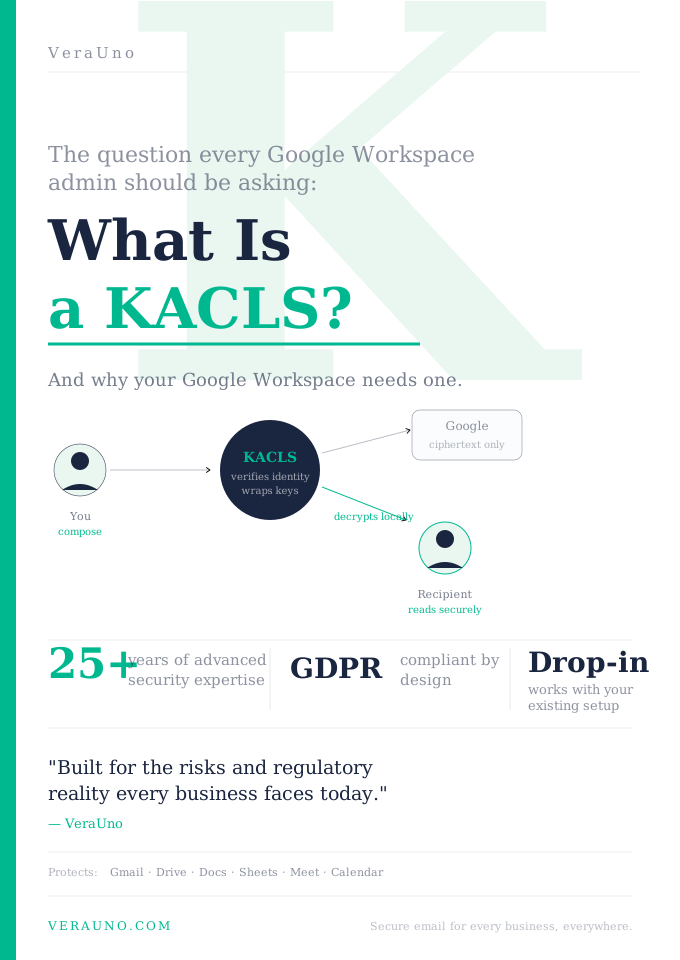
A typical client-side encryption flow works like this:
- The user composes a message in a client that supports CSE.
- The client generates a data encryption key (or uses an existing one) and encrypts the message content locally.
- To protect that data encryption key, the client contacts a Key Access Control List Service (KACLS).
- The KACLS decides, according to the organisation’s policies, whether the user is allowed to wrap (encrypt) or unwrap (decrypt) the key.
- If authorised, the KACLS returns a wrapped key. The client sends the ciphertext + wrapped key to the mail service.
- When a recipient opens the message, their client asks the KACLS to unwrap the key. If the recipient is authorised, the key is released and the content is decrypted on their device.
The KACLS is the policy and key-control point. It is the component that enforces who may encrypt and who may decrypt. Because it sits outside the mail provider, the provider never sees the unwrapped keys.
This separation is what makes true client-side encryption possible at scale inside platforms such as Google Workspace or Microsoft 365.
Both Microsoft and Google support for an external KACLS — and why a third party matters
Major platforms have recognised that many organisations need cryptographic control that the platform itself does not hold. Microsoft provides mechanisms that allow customer-controlled or external key services to participate in protecting content. The same architectural idea appears in Google Workspace Client-Side Encryption: the platform supplies the client-side encryption capability, but an external KACLS supplies the key access decisions.
Using an independent third-party KACLS is important for several reasons:
- Separation of duties — The company that stores the encrypted data is not the same company that controls the keys.
- Reduced provider access — Even under legal process, the mail provider can only produce ciphertext. The keys remain with the organisation or its chosen key service.
- Policy control and revocation — Access can be granted or revoked according to the organisation’s own rules (for example when employees or contractors leave).
- Trust and compliance — Regulated industries and security-conscious organisations often require demonstrable control over keys by an entity other than the collaboration platform itself.
When the KACLS is operated by an independent party (or by the organisation itself), the platform can no longer unilaterally access the content. That is the core guarantee CSE is designed to deliver.
Closing
Ordinary email and TLS protect the journey of a message. They do not protect the message from the service that carries it. Client-Side Encryption moves encryption to the device and places key control in a KACLS that the organisation (or a trusted independent provider) operates. The result is straightforward: the mail server sees only ciphertext, and only authorised end users can turn that ciphertext back into readable email.
In an environment where service providers routinely process and extract value from customer data, and where AI systems amplify that extraction, architectural control over encryption keys is no longer optional for many organisations. CSE, backed by an external KACLS, is how that control is achieved.
How It Works
- A session key is generated on your device
- Your message is encrypted with that key
- The key is encrypted with the recipient public key
- Only the encrypted bundle reaches our servers
- The recipient device decrypts with their private key